A clear offer
Structure and copy that help the right visitor recognise the value quickly.
Websites that bring in business
We design and build custom websites and web applications, from a focused business site to an ambitious platform with customer accounts, live data and complex interactions. The design and technology follow what your project needs.
Start a conversation
Tools we use for custom web projects
The tools follow the project: static pages where they fit, dynamic features and databases where needed, with custom design and development throughout.
Useful outcomes
Structure and copy that help the right visitor recognise the value quickly.
A design built around your company, not a template.
Fast pages that work on phones, computers and with assistive technology.
Pages and content organised so search engines can find and understand your business.
Measured live
Measured in your own browser while this page loaded, not a screenshot of someone else’s report.
The sites we build for clients are held to the same standard.
What is included
Example work
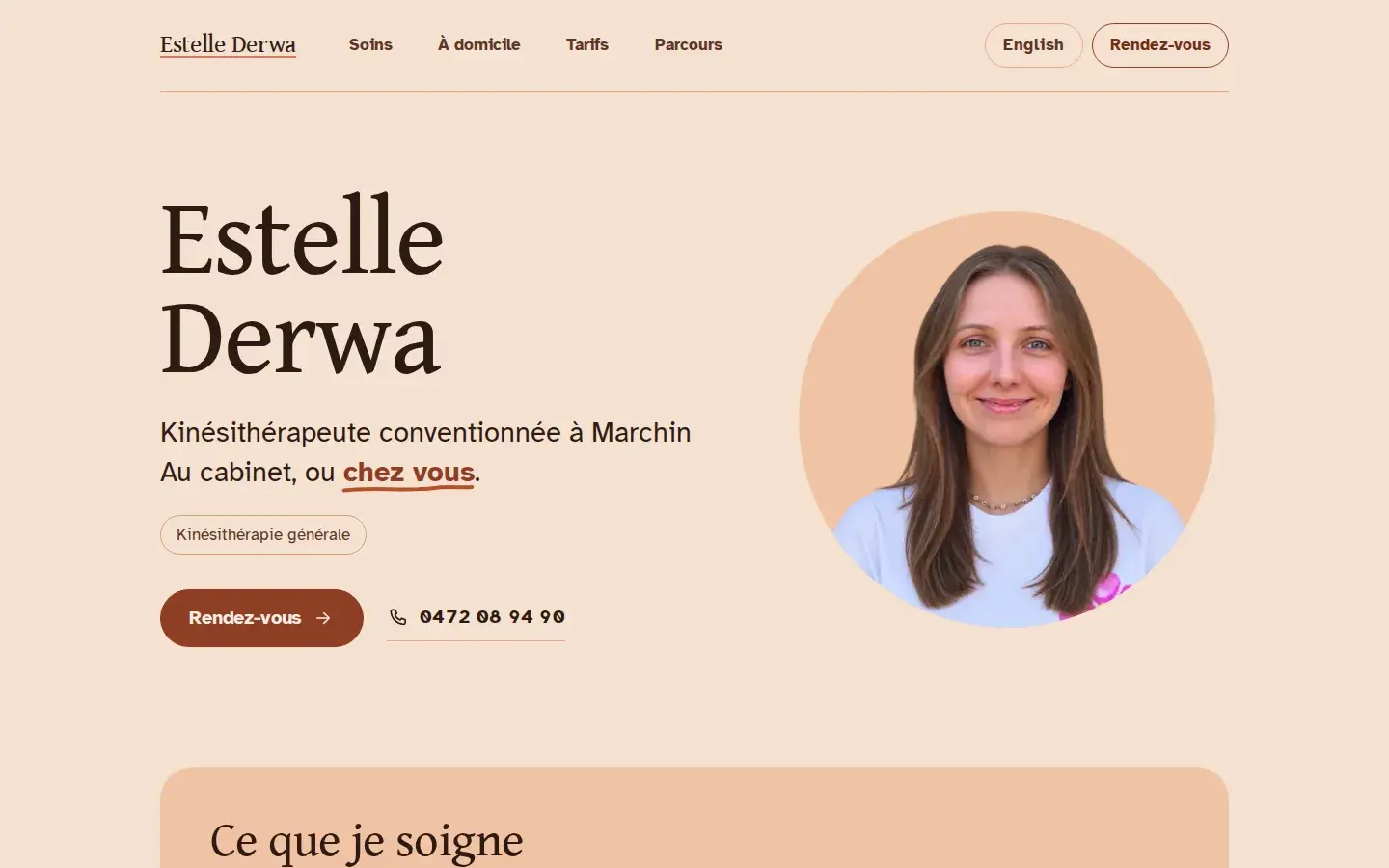
A bilingual website for an independent physiotherapist in Marchin, making treatments, home visits, fees and appointment requests easy to find and understand.
How we work
01
Define audiences, offers, proof and the action each page needs to support.
02
Create the page system and content hierarchy before polishing surfaces.
03
Develop the visual language and implementation together, testing on real screens.
04
Verify tracking, indexing and performance, then improve from real behaviour.
Apyos handles website content updates. Send us the changes and we publish them after checking the layout and content, with turnaround and pricing agreed in advance. This does not limit the features we build for your users: accounts, dashboards and business workflows are part of the project when needed.
In the European Union, consent is generally needed before using non-essential cookies or similar technologies that store or read information on visitors’ devices, for example for analytics, advertising or embedded media. Cookies strictly necessary for communication or a service the visitor requests, such as session, security or load-balancing cookies, are exempt; visitors still need to be told how they are used. Adding a banner when nothing requires consent can cost conversions without adding legal protection. For example, this website uses cookie-free Cloudflare Web Analytics and has no consent banner. We check the analytics and embedded services you need before deciding what consent controls belong on your site.
Budget depends on the features, page types, languages, content readiness and integrations. We also agree the cost of future content updates. Share your range early: we will explain what fits and what should wait.
A focused company site normally takes weeks rather than months once the offer and content owners are clear. Complex websites and web applications need a schedule based on their features, integrations and testing. We agree milestones around that scope rather than promising the same timeline for every project.
Yes. Semantic HTML, useful metadata, crawlable pages, structured data, language links, redirects and performance are part of the build. Rankings still depend on demand, competition, content and reputation after launch.
Our approach
Enquiries, analytics, content, SEO, the software behind it: the site has to play well with all of it, so we build it that way.
In detail
Before anything is designed, it helps to be blunt about who the site is for and what they are trying to decide. Someone comparing three suppliers needs different things from an existing customer looking for a phone number. Once the audiences and their decisions are written down, every page has a job, and the navigation stops being a picture of your org chart.
That work also settles the message. A service page has to say what the problem is, how you solve it, what is included and what happens next, in words a customer would use. Proof sits next to the claim it supports. Parking it all on a testimonials page nobody visits wastes it. And a page is allowed to help the wrong visitor conclude quickly that this is not for them. That is a good outcome, not a lost one.
Pages are designed with the actual content, never with placeholder text, because layouts that only work with tidy sentences fall apart on the day someone writes a long one. Type, spacing, images and interaction exist to create hierarchy, so that a visitor can scan a page in ten seconds and still find the detail when they want it. Shared patterns keep the site coherent without forcing every subject into the same shape.
Phones are not an afterthought, because that is where most visits arrive. Navigation, tables, forms and media have to stay understandable at 320 pixels wide, with tap targets people can hit and a reading order that makes sense without a mouse. Semantic headings, keyboard operation, visible focus, real alternative text and sufficient contrast come as standard. That is ordinary quality work. It does not need its own accessibility phase, and the interfaces that pass those checks tend to be better for everyone.
The architecture follows the project. Static pages make sense when the content and features suit them. Customer accounts, live data, complex interactions and connections to other tools call for dynamic functionality, which we design and build as part of the website or application. A project can combine both approaches. Performance matters in either case, so we keep the work done by the browser and server purposeful.
Images and fonts are sized and served properly, and pages are tested on real devices, because a developer’s laptop flatters everything. Speed is not a score to brag about. It is the difference between a visitor waiting and a visitor leaving, and it feeds directly into how well the site can be crawled. The figures further up this page were measured in your own browser while it loaded, which is the standard client sites are held to.
Apyos handles website content updates, from a changed phone number to a new service page or language. Send us the text or describe what needs to change; we update the site and check the result across screen sizes. We agree how updates are requested, their turnaround and their cost before the project starts.
Content maintenance is separate from what the application lets people do. Customer accounts, data entry, dashboards and business workflows are designed around their users. We build the features your team and customers need, whether the public website uses static pages, dynamic pages or a combination.
A contact form should ask for what is needed to reply and nothing else, and it should say clearly when it worked, when a field is wrong and when something failed. Enquiries can land in an inbox, a CRM or a qualification workflow without asking the visitor to repeat themselves. Spam protection and delivery monitoring matter more than they sound: the failure mode is a valuable enquiry disappearing silently, and nobody ever finds out.
Measurement starts from the questions worth answering: which pages bring people who enquire, which of those enquiries turn into work. Then it collects the least data that answers them. Privacy-friendly analytics are usually enough, but we also use tools that require a consent banner. We choose the tools together with you, based on what you need to measure. For example, this website uses cookie-free Cloudflare Web Analytics for aggregate page-view and performance statistics and has no consent banner.
A redesign can quietly destroy years of accumulated visibility. Old URLs are mapped and redirected, metadata and indexing rules are checked before the switch rather than after, and the DNS change is planned so the old site stays up until the new one is genuinely ready. Forms, analytics, responsive layouts and the main keyboard paths get tested on the real thing.
Afterwards, search data and the enquiries themselves show what visitors still misunderstand. Useful maintenance is fixing those pages, publishing something genuinely worth reading and keeping dependencies current, not redesigning because the site is two years old. A site should be easy to extend when there is a real new offer, audience or language. Until then, leaving it alone is a legitimate strategy.
We will not force your project into a template or add tools and features without a purpose. Complex functionality belongs when the project needs it; unnecessary overhead does not. We agree what is included and how it will be maintained before building.
Tell us what is slowing you down. You will get a straight answer.